
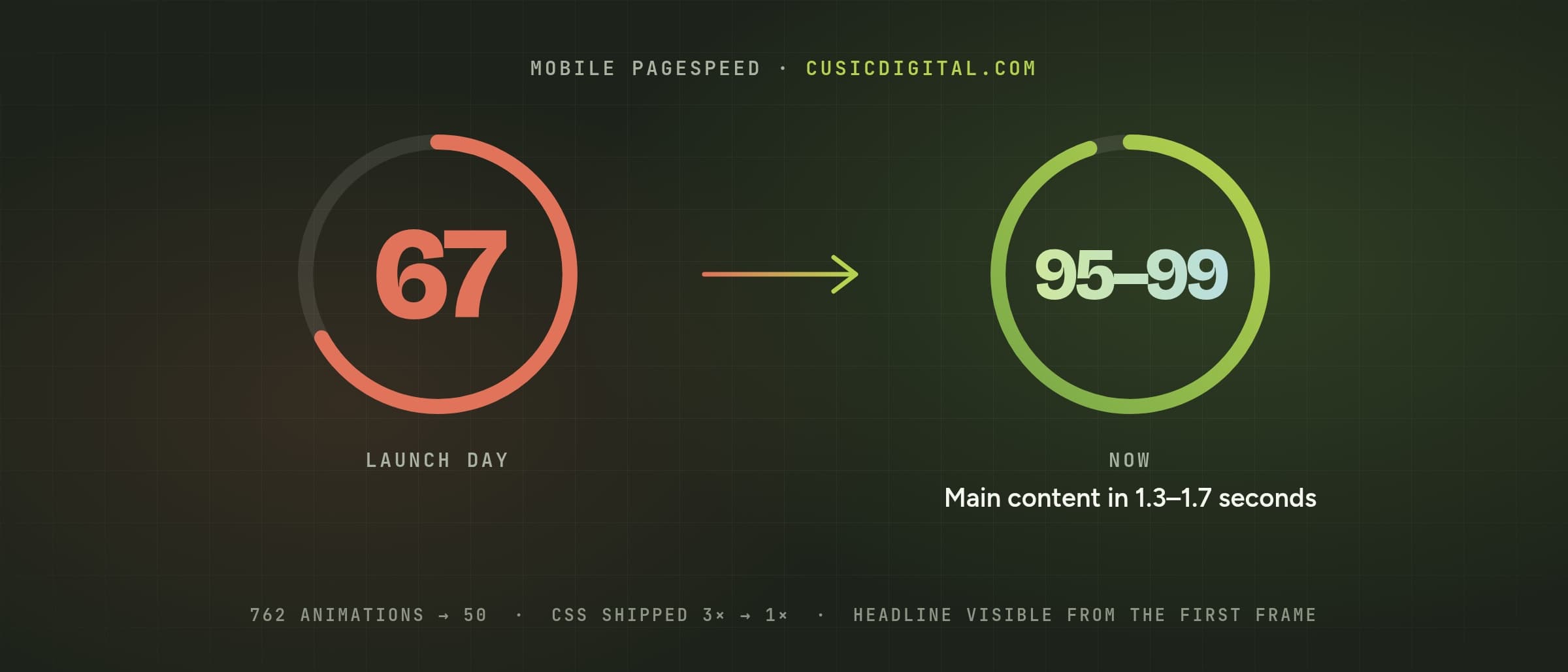
We sell website speed. So when our own redesigned homepage went live with a mobile PageSpeed score of 67, it stung.
The design itself wasn't the problem. Three details were: decoration we had added on purpose and never measured, a framework setting meant to make pages faster, and one line of CSS on the headline. Fixing them took the homepage to 95-99 on mobile, with the main content showing in 1.3-1.7 seconds instead of about 5.
This post walks through all three, with the numbers, the code, and what we'd check on any site.
Who this is for: engineers working on Next.js (or any framework that renders on the server and hydrates in the browser), and owners who want to know why a site that looks fine on their laptop scores badly on Google's phone test.
The short version
| If you are… | Here's the headline |
|---|---|
| Business / product | The page was carrying far more than it showed: hundreds of tiny animations and three copies of the same styling. Removing the duplicates made it lighter and let the headline appear first. Nothing visible changed. |
| Engineering | 762 individually animated SVG paths were serialized into both the HTML and the RSC payload; we merged them into 50. Then experimental.inlineCss put an 84 KB stylesheet in the <head> and Next copied it twice more into the RSC payload; turning it off took the compressed homepage from 123 KB to 74 KB. Finally, the hero headline faded in from opacity: 0, so it couldn't count as the LCP element. |
How we measured
All the "live" numbers below come from Google's PageSpeed Insights on the production homepage, phone mode. A single run can swing by several points, so we ran three and compared them.
The metric that matters most here is Largest Contentful Paint (LCP): how long until the biggest piece of content in view, usually the headline or hero image, is shown. Google treats under 2.5 seconds as good.
Problem 1: 762 animations nobody counted
The redesign has a "garden" theme. Root systems grow down from the top of some sections and into the footer, drawn by code so they look organic but render the same every time.
Each root was its own animated SVG <path>. The homepage had 502 of them in one section, and the footer added 231 more, on every page. Each one also had to be serialized twice: once into the HTML and once into the data React uses to take over the page in the browser (the RSC payload).
PageSpeed's verdict on launch day:
- 762 non-composited animated elements
- 4.4 seconds of main-thread work on a throttled phone
- Homepage HTML: 800 KB
- Mobile performance: 67
The fix
The roots didn't need to be individual elements to look individual. We now draw one combined path per depth and stroke width, plus one for the tips, and reveal the whole network with a single clip-path transition from the top down. The geometry is identical, so the footer roots still meet the seedlings above them.
| Before | After | |
|---|---|---|
| SVG paths | 917 | 234 |
| Animated elements | 762 | 50 |
| Homepage HTML | 800 KB | 590 KB |
The lesson: decorative motion has a cost per element, not per effect. Ten thousand pixels of animation in one element is cheap. The same picture split into hundreds of animated pieces is not, and on a server-rendered page you pay for it twice.
It helped, but it wasn't the whole story. A month later the score was in the high 70s and the main content still took 4.8-5.0 seconds to appear on Google's phone test, and our own free website check put "slower than it should be on phones" at the top of our list. Being flagged by your own tool is a good motivator.
Problem 2: the stylesheet, three times
Next.js has an experimental setting, inlineCss, that puts your stylesheet directly in each page instead of in a separate file. The idea is sound: the browser can paint without waiting on a second, render-blocking request. We had turned it on for exactly that reason.
// next.config.ts (before)
const nextConfig: NextConfig = {
  experimental: {
    // Ship the stylesheet inside the HTML, so first paint doesn't wait
    // on a separate render-blocking request.
    inlineCss: true,
  },
};
What we hadn't checked was what it did to the page's size. Looking at the raw HTML, the 84 KB Tailwind stylesheet appeared in the <head> as expected, and then twice more inside the RSC payload that Next.js streams with the page. Every page carried the same CSS three times, about 40% of the homepage. On a phone, all of it downloads before the headline can appear.
The fix
We turned the setting off. The CSS goes back to being one separate file, which the browser downloads once and reuses on every other page.
// next.config.ts (after)
const nextConfig: NextConfig = {
  // No experimental.inlineCss: it put the 84 KB stylesheet in every page and
  // Next also copied it twice into the RSC payload. A separate, cached
  // stylesheet is lighter.
};
The compressed homepage went from 123 KB to 74 KB, and every other page got the same saving.
The lesson: "inline the critical CSS" is good advice when the CSS is small and appears once. Check what your framework actually sends. View the page source, search for a distinctive class name, and count how many times it shows up.
Problem 3: the headline that wasn't there yet
The last issue was the smallest change and the most interesting cause.
The hero headline had an entrance animation: it rose into place while fading in from fully transparent.
/* before */
@keyframes hero-rise {
  from { opacity: 0; transform: translateY(26px); }
  to   { opacity: 1; transform: translateY(0); }
}
It looked nice. But an element at opacity: 0 can't count as the page's largest content. When the browser looked for the LCP element, the headline was invisible, so it picked the next biggest thing: our small logo. PageSpeed then charged all the page's early JavaScript work to that logo, and reported a long "render delay" for the page's main content.
The fix
The headline still moves; it just never disappears. It settles into place from a few pixels lower, fully visible from the first frame.
/* after: the LCP element is never invisible */
@keyframes hero-settle {
  from { transform: translateY(14px); }
  to   { transform: translateY(0); }
}
Visitors who ask their device for reduced motion get no animation at all, as before.
The lesson: never fade in your LCP element. Animate the decoration around it, or animate position only.
The result
PageSpeed Insights on the live homepage, phone mode, three runs:
| Launch day | A month later | Now | |
|---|---|---|---|
| Mobile performance | 67 | high 70s | 95, 95, 99 |
| Main content shown (LCP) | n/a | 4.8-5.0 s | 1.7, 1.7, 1.3 s |
| Accessibility, Best Practices, SEO | 100 |
The page looks exactly as it did on launch day. It just stopped carrying things nobody could see.
A checklist for your own site
- Run PageSpeed Insights three times on mobile and look at the middle result, not the best one.
- Find your LCP element (PageSpeed names it). If it isn't your headline or hero image, ask why.
- Never fade in that element. Animate position, or animate something else.
- View the page source and search for one of your CSS class names. If it appears more than once, you're shipping duplicates.
- Count animated elements, not animations. Hundreds of small animated SVG pieces cost far more than one larger one.
- Re-measure on the live site after every fix. Local Lighthouse runs a different version and a different network, so treat it as direction, not the final word.
If you'd rather not do this by hand, our free website check runs Google's test three times, names the element holding your page back, and tells you what to fix first. It's the same check that flagged ours.
Discussion
Questions or ideas about this post? Leave a note below.
Leave a comment
Comments are moderated before they appear.